
Your Cart



What Is Immersive Sound? A Home Theater Guide
If you have shopped for a soundbar, AV receiver, or entertainment furniture recently, you have likely seen "immersive sound" printed on almost every box. But what does that actually mean? Do you need a dedicated theater room with six ceiling speakers to get it, or can you enjoy spatial audio in a standard Midwest living room?
In this guide, you will learn how immersive sound works, how it differs from traditional surround sound, and what factors actually influence what you hear. We will break down speaker configurations (like 5.1.2), explain how room acoustics and furniture placement affect clarity, and share practical advice from our showroom team on planning an entertainment space you can comfortably enjoy for a two-hour movie.
SHORT ANSWER
What Is Immersive Sound?
Immersive sound uses object-based spatial audio technology (such as Dolby Atmos and DTS:X) to place audio elements within a three-dimensional listening area around and above you rather than routing sound strictly through fixed left and right channels. In a home theater, your overall audio quality depends on four connected factors: audio format, speaker layout (such as a 5.1.2 configuration), room acoustics, and your seating position.
Living Room or Dedicated Theater Room: What Do You Actually Need?
The short version: most living rooms can get a real taste of immersive sound without a single wire in the wall. Here is the honest ladder:
- An Atmos soundbar with up-firing drivers is the entry point. One box under the TV bounces height cues off your ceiling, and it handles dialogue and bass better than TV speakers. If your movie nights are casual, you can comfortably stop here.
- A 5.1.2 speaker system is the step up for people who watch a lot of movies. Real surround speakers behind you and dedicated height channels deliver placement a soundbar can only approximate.
- In-ceiling speakers and a dedicated theater room are for enthusiasts: people who watch in the dark several nights a week and want the full effect. If that is not you, there is nothing wrong with skipping it.
One genuine limit worth knowing: up-firing drivers need a flat ceiling. They work by bouncing sound off the ceiling above your seat, so vaulted ceilings, angled ceilings, and tall open lofts break the reflection path. In those rooms, in-ceiling speakers or a good virtualization soundbar are the realistic options, and it is worth hearing the difference in person before spending money.
How Spatial Audio Creates 3D Sound
Immersive sound is a modern audio technology that places listeners inside a three-dimensional sound environment rather than in front of traditional speakers. Instead of hearing audio from fixed directions like left or right, immersive audio creates the sensation that sound exists above, behind, and all around you.
In traditional audio, sounds are mixed into rigid channels. If an explosion happens on screen, the audio engineer assigns that sound to the front right speaker. In immersive audio, sound engineers treat individual audio elements as independent "sound objects." Each object carries coordinates that describe where it moves through the room.
Whether you are watching a thunderstorm in a film, tracking footstep directions in a video game, or listening to a live orchestral recording, immersive sound recreates natural spatial hearing cues that help your brain identify depth, height, and distance.

Stereo vs. Surround Sound vs. Immersive Sound: What Is the Difference?
Understanding home audio formats comes down to one fundamental difference: how the sound field is constructed. Audio formats have evolved over several decades from a single flat front plane into a full three-dimensional sphere.
| Audio Format | Audio Placement | Sound Field | Height Channels | Typical Speaker Setup |
|---|---|---|---|---|
| Stereo | Channel-based (2 channels) | Front left and right plane | None | 2.0 (TV speakers) or 2.1 (stereo pair + subwoofer) |
| Traditional Surround | Channel-based (5 or 7 channels) | Horizontal 360-degree circle around listener | None | 5.1 or 7.1 (Center, Front L/R, Surround L/R, Sub) |
| Immersive Audio | Object-based (dynamic 3D coordinates) | Full 3D hemisphere (around + above listener) | Yes (ceiling or upward-firing) | 5.1.2, 5.1.4, or 7.1.4 configurations |
While traditional 5.1 surround sound surrounds you on a horizontal plane, it cannot place sound above you. When an aircraft flies over the camera in a 5.1 mix, the sound simply pans from the front speakers to the rear speakers. With immersive audio formats like Dolby Atmos and DTS:X, the aircraft sound moves physically overhead through dedicated height channels.
How Does Immersive Sound Work in a Home Theater?
In a home theater or living room, immersive audio formats rely on three core elements: an audio processor or AV receiver that decodes object metadata, a speaker layout with height capability, and proper room calibration.
Decoding the Numbers: What Does 5.1.2 Mean?
If you have looked at home theater systems, you have probably seen three numbers separated by periods (such as 5.1.2 or 7.1.4). Here is what each number represents:
- The First Number (5 or 7): The number of traditional ear-level speakers. A 5-speaker base includes Center, Front Left, Front Right, Surround Left, and Surround Right. A 7-speaker base adds two rear surround speakers.
- The Second Number (.1 or .2): The number of dedicated subwoofers for low-frequency bass effects.
- The Third Number (.2 or .4): The number of dedicated height channels. These can be ceiling-mounted speakers or upward-firing speaker modules that reflect sound off a flat ceiling.
For more detailed technical guidelines on room-by-room speaker layouts, Dolby provides an authoritative speaker setup guide illustrating exact degree angles for ear-level and height speakers.
Visualizing a 5.1.2 Home Theater Room Setup
Here is how a standard 5.1.2 immersive sound configuration is organized in a typical living room or media space, showing speaker placement relative to the primary seating area:
TOP-DOWN 5.1.2 LAYOUT Speaker Placement and Primary Seating Position
SUB Subwoofer
L Front Left
CENTER Center Channel
R Front Right
Height Channel (L) In-Ceiling or Upward-Firing
Height Channel (R) In-Ceiling or Upward-Firing
SL Surround Left
★ Sweet Spot: Optimal Position
Left
Sweet Spot Center
Right
SR Surround Right
30 to 36 Inches of Rear Walking Clearance
5 Bed Speakers: Center, Front L/R, Surround L/R (Ear-Level)
1 Subwoofer: Low-Frequency Bass Effects (LFE)
2 Height Channels: Overhead Spatial Audio
Sweet Spot: Equilateral Triangle with Front Speakers
How Room Acoustics and Layout Affect Immersive Audio
The performance of an immersive sound system depends heavily on how sound moves through your space. High frequencies travel in directional lines, while lower bass frequencies radiate omnidirectionally. Hard surfaces like drywall, hardwood floors, large mirrors, and uncovered windows bounce sound waves repeatedly, creating "slap echo" that blurs the directional cues immersive audio relies on.
Controlling reflections does not require ugly acoustic foam on every wall. Everyday home furnishings act as natural acoustic dampening:
- Plush Area Rugs: Placing a dense area rug with a felt pad between your TV and your seating absorbs primary floor reflections that otherwise muddy spoken dialogue.
- Upholstered Seating: Fabric-upholstered sectionals and sofas break up room reflections significantly better than empty floor space.
- Drapery and Curtains: Heavy fabric curtains over windows prevent sound from bouncing off glass.
- Bookshelves and Casegoods: Open shelving with books or decor scatters sound reflections naturally (diffusion), helping sound feel more open and realistic.
Where the Media Console Fits In
The console under your TV is part of your front sound stage, whether it is treated that way or not. A few things we watch for on the showroom floor:
- Height and depth for a center channel or soundbar. The center speaker is where almost all dialogue comes from, and it is usually the biggest box in the system. A console shelf sized only for a cable box means the center channel ends up awkwardly in front of the cabinet, or the soundbar ends up blocking the bottom of the screen. Measure your center channel or soundbar before choosing the console, not after.
- Open front or closed doors. Solid cabinet doors muffle a center speaker and smear dialogue, and glass doors reflect it. Open shelving, fabric-front panels, or a console with a wide open bay keep the front stage sounding like it should. If you need closed storage for game consoles and remotes, plan a side bay for the speaker itself.
- Width for the whole front stage. A 5.1 front stage is three speakers plus a subwoofer, and they want to sit in a shallow arc, not stacked in a corner. A console a foot wider than your TV gives the left and right channels room to breathe without crowding the screen.
- Buy the console after the speaker plan, not before. The most common order mistake we see is a console chosen for looks first, then a soundbar that physically does not fit it. Pick your audio setup (even roughly), then choose the furniture around it.
You can browse our TV stands and media consoles sized for real home theater equipment.
What Should You Look for in Home Theater Seating?
To be clear: furniture does not create or process audio. Your receiver, speakers, and room calibration do that work. What your seating controls is simpler, and it matters more than people expect: where your head ends up for two hours, whether you can see the screen without craning, and whether you are still comfortable when the credits roll.
It also helps to know when you don't need theater seating at all. If your TV room is also the family room and most nights are a couple of episodes before bed, a well-built sofa or sectional with a comfortable seat depth will serve you fine, and cost less. Theater-style power recliners earn their price when you watch full-length movies several nights a week or game for long sessions. They also need an outlet near the seating and typically run roughly twice the price of manual recliners. Across our catalog, manual recliners generally start around $300 while power-headrest models generally start around $500, with typical prices near $700 and $1,400 respectively.
If that is you, here are the four capabilities worth paying for:
01
Power-Adjustable Headrests
When a standard recliner leans back, your head goes with it. Your eyes end up aimed above the screen, so you either strain your neck looking down at the picture or slump until the tall chair back sits between you and the side speakers. A power headrest tilts forward on its own, so you can lie back with your feet up and still look straight at the screen.
02
Independent Power Reclining
Dual-motor or triple-power mechanisms let you adjust footrest elevation separately from backrest recline. This lets you elevate your feet to relieve lumbar pressure without reclining so far back that you slide out of the primary listening zone.
03
Zero-Wall Reclining Clearance
Standard recliners need 12 to 18 inches behind the chair to recline fully, which pushes seating too close to front speakers in modest rooms. Zero-wall or wall-hugger recliners slide forward as they open, requiring only 4 to 6 inches of clearance behind the backrest.
04
High-Density Foam Cushioning
Soft, pillowy cushions feel great for five minutes in a showroom but cause lower-back fatigue after an hour of movie watching. Dense 2.0+ lb structured core foam maintains ergonomic spinal support and keeps your posture consistent across long gaming or movie sessions.
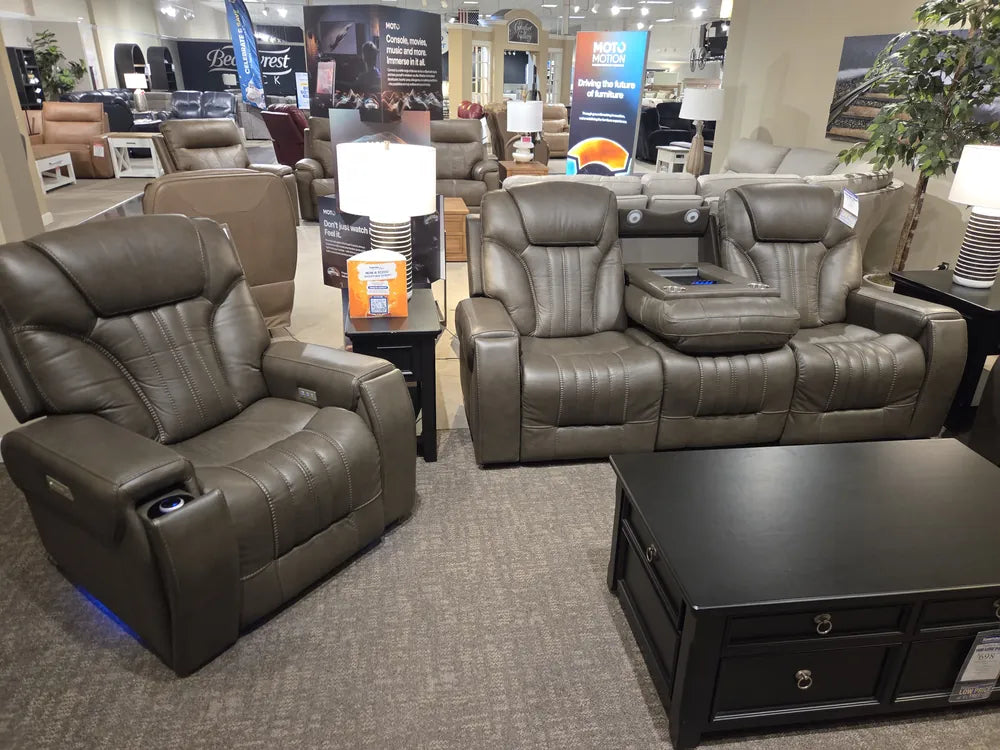
SEATING SPOTLIGHT
Where Moto Motion Fits In
If that checklist sounds familiar, it is because collections like Moto Motion were built around it: power-adjustable headrests, power lumbar support on triple-power models, and zero-gravity recline. See the Moto Motion Collection Overview for how the mechanisms compare side by side.
From the Showroom Floor: 4 Home Theater Mistakes to Avoid
When customers come into our showrooms planning a home theater or media room, we see the same planning mistakes repeat themselves:
Customers will spend months researching subwoofers and Atmos receivers, and then they will buy an oversized sectional that blocks their surround speakers and leaves no room to walk. I always tell folks: figure out your room clearances first. Measure where people actually walk, make sure your recliners have room to open without hitting speaker stands, and get seating that lets you adjust your head forward when you recline. If you are craning your neck or staring at the ceiling after forty-five minutes, all the Dolby Atmos in the world will not save your movie night.

1. Buying Seating Before Measuring Speaker Clearance
Surround speakers need at least two to three feet of separation from listeners to prevent sound from overpowering one ear. Placing a wide sectional right against the side walls leaves zero room for surround stands.
2. Ignoring Head Position When Reclined
Test the recline before you buy, not just the sit. Lean all the way back in the showroom and check whether you are still looking at the screen. If you are looking at the ceiling, you need a power headrest (see above).
3. Underestimating Walking Clearance Behind Seating
Leave at least 30 to 36 inches of walking space behind primary theater seating so family members can get drinks or snacks without stepping over reclined footrests.
4. Overspending on Electronics While Neglecting Ergonomics
A $3,000 sound system sounds incredible, but if your seating causes back pain an hour into the movie, you will end up finishing it on the tablet in bed. Balance your audio budget with supportive seating.
Frequently Asked Questions About Immersive Sound
Is immersive sound the same as surround sound?
No. Traditional surround sound (such as 5.1 or 7.1) places audio on a flat 360-degree horizontal plane around you. Immersive sound (such as Dolby Atmos or DTS:X) adds height channels and treats audio elements as individual 3D objects that can move freely above and around the room.
Do you need ceiling speakers for immersive sound?
Not necessarily. While in-ceiling speakers provide the most direct overhead sound effects, upward-firing Atmos-enabled speakers reflect sound off a flat ceiling down to your listening position. Many standalone soundbars also use spatial virtualization algorithms to simulate height without physical ceiling speakers.
What does 5.1.2 mean in a speaker setup?
In a 5.1.2 setup, the first number (5) represents traditional ear-level speakers (Center, Front Left/Right, and Surround Left/Right). The second number (.1) is the subwoofer for bass effects. The third number (.2) represents two dedicated height channels for overhead audio.
Can an immersive soundbar create realistic 3D sound?
Yes, in standard rectangular rooms with flat ceilings. Modern Dolby Atmos soundbars use upward-angled drivers and room-sensing microphones to bounce sound off your ceiling and walls. While discrete multi-speaker systems offer greater precision, quality soundbars provide a compelling 3D experience without running wire through walls.
Where is the best place to sit for immersive sound?
The optimal listening position (often called the "sweet spot") is centered between your front left and right speakers, forming an equilateral triangle. Position your seating approximately one-third to two-thirds into the room depth to avoid bass standing waves against back walls, and keep ears at approximately the same height as your front tweeters.
Can I add Atmos to my existing 5.1 system?
Yes, in two ways. If your AV receiver is Atmos-capable, you can add two upward-firing or in-ceiling height modules to your existing 5.1 speakers to create a 5.1.2 layout without replacing anything. If your receiver is older, an Atmos-capable soundbar or a receiver upgrade is the simpler path. Either way, your existing front and surround speakers can stay.
Will an Atmos soundbar work in a room with a ceiling fan?
Mostly, yes, but with a caveat. Up-firing drivers bounce height cues off the ceiling, and a ceiling fan sits directly in that path. With the fan off, the effect works normally. With the blades spinning, you may notice the height effects flicker or soften slightly. It is usually a minor compromise rather than a dealbreaker, but if you run a fan during every movie night, in-ceiling speakers placed away from the fan, or a soundbar that relies more on virtualization, are worth considering.
The Bottom Line: Bringing Immersive Sound Home
You may have started researching "immersive sound" wondering whether it is marketing buzz or a genuine upgrade to home entertainment. As we have seen, immersive audio is a genuine technological advance: it shifts audio from static speaker channels to dynamic 3D objects that move naturally around and above you.
Getting the most out of immersive audio does not require an endless budget, but it does require coordinating four connected elements: the content format, your speaker arrangement, your room acoustics, and your seating position.
If you are planning the seating and layout for an entertainment room or living room, Furniture Fair's showroom teams across Ohio, Kentucky, and Indiana can help you test sightlines, measure room clearances, compare media consoles sized for your front stage, and explore power reclining seating in person.